Conferences are full of valuable moments. Attendees meet new people, visit booths, watch presentations, join breakout sessions, attend networking events, and capture photos throughout the day. Yet many conference organizers struggle to collect those moments in one organized place.
A few official photos may come from the event photographer, but attendee-generated content is often scattered across social media, personal camera rolls, group chats, and emails. Nalu Moments gives conference organizers a simple way to collect photos and videos from attendees through a QR code and custom event page.
Why conference photo sharing matters
Conference photos are not only memories. They are marketing assets, engagement signals, sponsor value, and proof of event energy. Strong visual content can help promote next year’s event, recap the current event, thank sponsors, highlight speakers, and show attendees what they were part of.
Attendee photos are especially valuable because they show the event from the participant’s perspective. They capture networking, booth interactions, hallway conversations, packed rooms, and spontaneous moments that official coverage may miss.
The limits of official event photography
Professional photographers are important for conferences. They can capture keynote speakers, sponsor booths, stage shots, step-and-repeat photos, and polished crowd images. But conferences are complex. Multiple sessions may happen at the same time. Attendees move through different spaces. Small moments happen quickly.
No photographer can be in every breakout room, every booth, every networking corner, and every after-hours event at once. Attendees collectively cover far more ground. A shared upload gallery makes it possible to gather that broader perspective.
Hashtags are helpful, but not enough
Many conferences use hashtags to encourage social sharing. Hashtags can increase visibility, but they are not a complete collection strategy. Attendees may use the wrong hashtag, post from private accounts, share only a few selected photos, or avoid public posting altogether. Videos may be posted as stories and disappear quickly.
A QR code gallery gives attendees a direct way to share with the organizer. Social media can still be part of the strategy, but it should not be the only place content is collected.
How a QR code improves participation
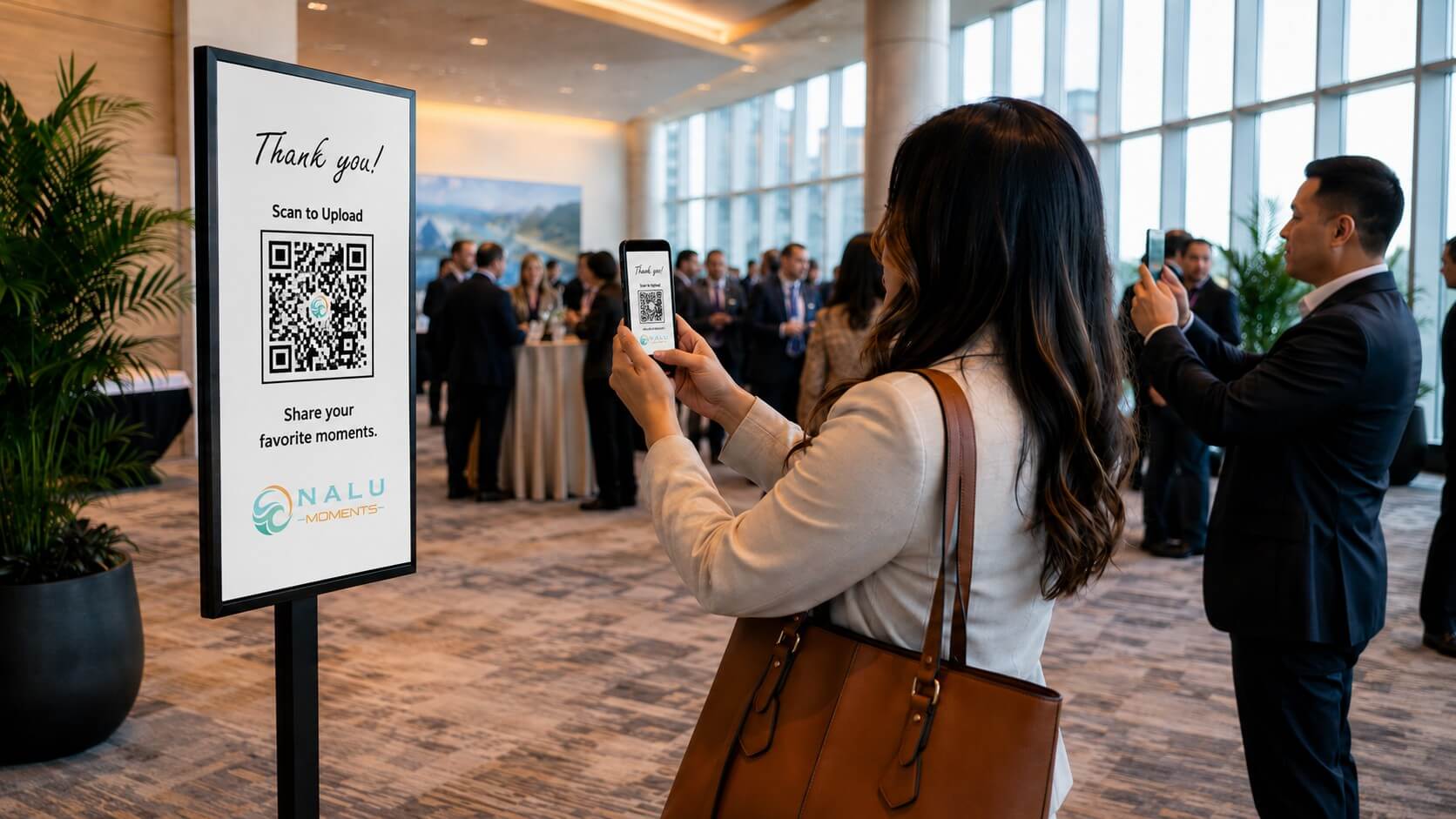
QR codes work well at conferences because attendees are already scanning badges, downloading resources, visiting exhibitor pages, and engaging with digital tools. A QR code for photo sharing fits naturally into that environment.
Organizers can place the code on signage, event programs, lanyard inserts, sponsor tables, presentation slides, booth displays, and digital screens. The message can be simple: “Share your conference photos and videos” or “Help us capture the event from your perspective.”
Where to promote the gallery
The most effective placements are the ones attendees see repeatedly. Consider adding the QR code to:
- Registration and check-in signage
- Welcome slides before keynotes
- Breakout room screens
- Networking event signs
- Sponsor and exhibitor areas
- Event app announcements
- Email reminders
- Closing session slides
- Post-event thank-you emails
The more naturally the QR code appears, the more likely attendees are to use it.
Create sponsor value
Attendee-generated photos can help demonstrate sponsor visibility. Sponsors want to know that people interacted with their booths, signage, activations, and sessions. A shared gallery can reveal moments that official photographers may miss.
Organizers can use selected photos in sponsor recap reports, post-event emails, and renewal conversations. This does not replace formal metrics, but it adds visual proof of engagement.
Improve post-event marketing
The days after a conference are a critical content window. Attendees are still thinking about the event, sponsors are looking for recaps, and potential future attendees may be paying attention. A shared photo collection gives the organizer more material to create posts, highlight reels, newsletters, and blog recaps.
Instead of waiting for a small batch of official photos, the organizer can review attendee uploads and select authentic moments that reflect the energy of the event.
Support multi-day events
For multi-day conferences, a Nalu Moments event page can collect content across the entire experience. Attendees can upload from day one, day two, networking receptions, workshops, and closing sessions. The gallery becomes a living archive rather than a one-day folder.
This is especially useful for conferences with multiple tracks, locations, or evening events. Attendees help document the parts of the event they personally experienced.
Encourage quality submissions
To improve the usefulness of the gallery, provide simple prompts. Ask attendees to upload:
- Favorite speaker moments
- Networking photos
- Booth interactions
- Team photos
- Workshop highlights
- Behind-the-scenes moments
- Short video clips
- Photos with new connections
Prompts help attendees think beyond selfies and capture content that tells a fuller story.
Review before publishing
Conference organizers should review attendee submissions before using them publicly. This helps ensure brand quality, speaker preferences, sponsor considerations, and attendee privacy are respected. A shared gallery is a collection tool; the organizer should still curate what appears in official marketing.
Why Nalu Moments works for conferences
Nalu Moments simplifies conference photo collection by giving everyone one clear place to upload. Attendees do not need to email files, join a folder, or remember a hashtag. They scan the QR code and contribute to the gallery.
For organizers, this means more content, better event recaps, stronger sponsor storytelling, and a richer archive of the conference experience. The best conference memories are not always on stage. Many happen in the crowd, in the hallways, and in the conversations between sessions. Nalu Moments helps capture them.
FAQ
How do conferences collect photos from attendees?
A QR code linked to a shared event gallery is one of the easiest ways to collect attendee photos and videos.
Should conferences still use hashtags?
Yes, hashtags can help public engagement, but they should support a direct upload gallery rather than replace it.
Can attendee photos be used in marketing?
Organizers should review submissions and follow their event terms, privacy notices, and permission practices before public use.
Where should the QR code be displayed?
Use check-in signage, presentation slides, digital screens, event emails, sponsor areas, and post-event messages.
Make your next conference easier to recap, promote, and remember. Use Nalu Moments to collect attendee photos and videos in one organized gallery.
Practical setup checklist
For best results, treat photo sharing as part of the event plan instead of an afterthought. Create the event page early, test the QR code on multiple phones, print the sign clearly, and ask one or two people to remind guests during the event. The simpler the instructions are, the more likely guests are to participate. After the event, send the same link again in a thank-you message so anyone who forgot to upload still has an easy way to contribute. This small follow-up can dramatically increase the number of photos and videos collected.
A strong setup includes three touchpoints: a visible printed sign, a brief verbal reminder, and a follow-up link after the event. That combination works because it reaches guests in different moments. Some people will scan during the event, some will upload later that night, and others will need the reminder the next morning. The goal is not to pressure anyone. The goal is to make sharing so easy that people are happy to contribute.
The final step is to review and organize the uploads while the event is still fresh. Save favorite moments, identify photos that can be used in recaps or thank-you messages, and note which signs or reminders worked best. That review helps improve the next event and turns a simple gallery into a long-term memory resource.